When you open a VPS price list you will now see two kinds of plan with the same vCPU and RAM numbers: Shared CPU and Exclusive CPU. The second costs roughly double, and nothing about the spec line (2 vCPU, 4 GB) explains why. This guide does.
The short version: both are real KVM virtual servers with root access, their own IP address and NVMe storage. The difference is only in who else is using the processor cores underneath you, and that decides how steady your performance is. Whether steadiness is worth the extra money depends entirely on what you run.
The short answer
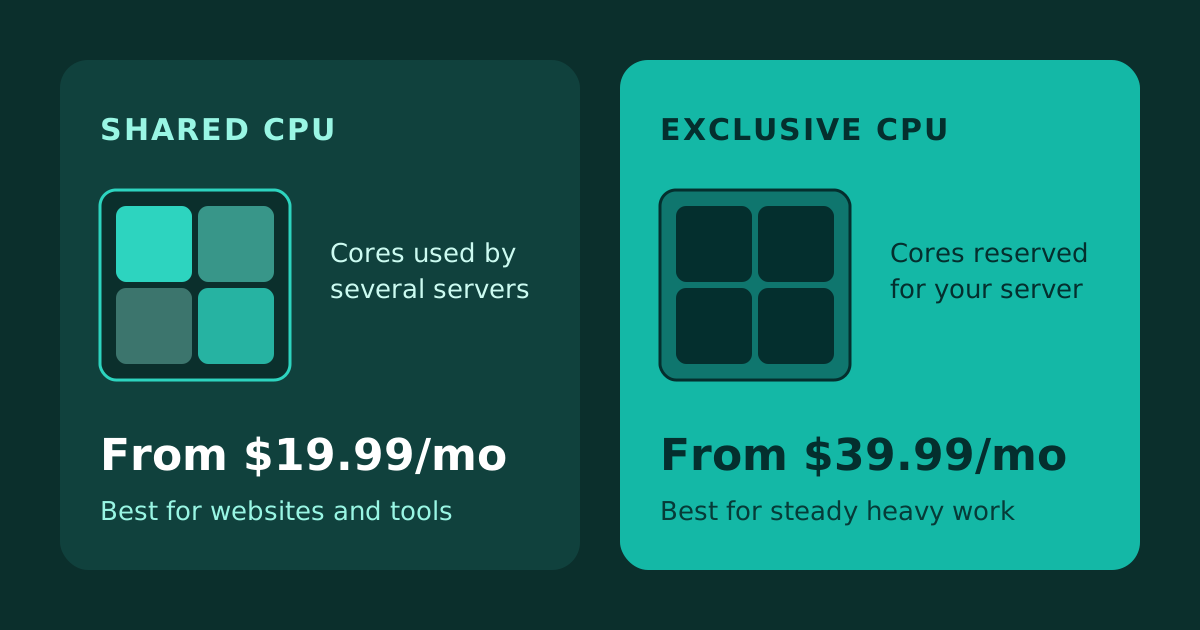
- Shared CPU from $19.99/mo: the right choice for websites, test servers and small tools. Best value for most people.
- Exclusive CPU from $39.99/mo: cores reserved for your server. Worth it for databases, builds, game servers and anything time-sensitive.
- Same RAM, same NVMe disk, same root access. Only the processor differs.
What "shared" and "exclusive" CPU actually mean
A VPS does not own a processor. It is handed a number of virtual cores (vCPUs), and those are mapped onto the physical cores of the machine it runs on.
On a shared CPU plan, those physical cores are also used by other servers on the same machine. When your neighbours are quiet, your server can use plenty of processing power. When several of them are busy at once, the cores are divided between everyone and your share can shrink. Most of the time you will not notice. Sometimes you will.
On an exclusive CPU plan, the cores assigned to your server are reserved for it. What your neighbours do does not change how much processor time you get, so the same job takes about the same time whether it is run at noon or at three in the morning.
Memory, storage and network are not what this choice is about. A shared and an exclusive server of the same size have the same RAM and the same disk. The difference is the processor, and only the processor.
What each costs
Prices vary a little by location, so check the plan page for your city. In most locations the monthly prices look like this:
| Size | Shared CPU | Exclusive CPU |
|---|
| 1 vCPU / 2 GB | $19.99 | $39.99 |
| 1 vCPU / 4 GB | $24.99 | $59.99 |
| 2 vCPU / 4 GB | $34.99 | $89.99 |
| 2 vCPU / 8 GB | $49.99 | $114.99 |
| 4 vCPU / 8 GB | $64.99 | $149.99 |
| 4 vCPU / 16 GB | $89.99 | $199.99 |
| 8 vCPU / 16 GB | $109.99 | $249.99 |
A few locations price differently (Kuwait and Egypt, for example), and exclusive plans are not sold in every city. Each location page lists exactly what is available there, with a tab for Shared CPU and one for Exclusive CPU.
The pattern to notice is that exclusive costs a little more than twice as much at the small end and a little over twice as much further up. You are paying for the guarantee, so it should be a guarantee you will use.
See both for your city
Pick a location and compare the same size on the Shared CPU and Exclusive CPU tabs, with the price on each card.
When shared CPU is the right choice
Most websites and small services spend nearly all of their time waiting: for a visitor, for a database answer, for a request to arrive. Their processor use is a series of short bursts. For that pattern shared CPU is a good fit, and paying double for reserved cores buys you very little.
- WordPress, WooCommerce and other websites. Page requests are short and spread out. A cache in front of the site matters far more than the type of CPU.
- Development, staging and test servers. Nobody minds if a build takes a few seconds longer.
- Small APIs, bots and internal tools that mostly idle.
- VPNs and proxies. The limit is usually the network, not the processor.
- Hosting several small sites on one server.
A useful trick here: if a shared 2 vCPU server feels tight, look at the next size up before you look at exclusive. A shared 4 vCPU / 8 GB server at $64.99 has more total processing room than an exclusive 2 vCPU / 4 GB server at $89.99, and for bursty work that extra room is what you feel.
When exclusive CPU earns its price
Exclusive CPU is for work where the processor is busy for long stretches, or where an occasional slowdown costs you something.
- Databases under steady load. Query time that wobbles with a neighbour's activity shows up as a slow app. If your database is the bottleneck, consistent cores are the first thing to try.
- Builds, CI runners, video encoding and data processing. These run the processor flat out for minutes at a time. That is the situation where cores shared with others hurt most.
- Game servers. Servers for games such as Minecraft or Rust care about how long each tick takes. A bad tick is a visible lag spike for every player.
- Trading bots and anything time-sensitive. If a delayed reaction costs money, predictable timing is worth paying for.
- AI inference and other long compute jobs that keep every core busy.
- Services with a performance promise. If you have customers who expect a steady response time, you want a server whose speed does not depend on strangers.
How to tell from your own server
You do not have to guess. Look at what your current server does.
- Check CPU use over a normal week. If it sits near idle with short spikes, you are a shared CPU workload. If it stays high for long periods, for example above 60–70% for an hour at a time, you are close to needing exclusive cores or a bigger plan.
- Look at "steal" time. On Linux, run
top and read the st value in the CPU line. It shows how much time your server wanted the processor and did not get it. A value that stays above a few percent is the clearest sign that shared cores are holding you back.
- Check whether slowness has a pattern. If the same job is fast at some hours and slow at others for no reason you can find in your own code, the cause is often outside your server.
If none of those apply, stay on shared. You can move up later, and nothing about shared CPU is a trap.
A note on bigger numbers and other options
Exclusive CPU is not the only way to get more processing power. In cities where we also offer our Regular CPU and High Frequency lines, the High Frequency plans use faster processors with larger NVMe disks, and that can matter more than exclusivity for single-threaded work. If you are not sure which line suits you, the location page shows all of them side by side.
So which one should you buy?
Buy shared CPU for websites, test servers, small tools and anything that is mostly idle. It is the better value, and a larger shared plan solves most "my server feels slow" problems.
Buy exclusive CPU for databases under steady load, builds, encoding, game servers and anything where a slow moment has a price. You are buying consistency, so buy it where you will notice it.
Ready to look at plans? Open the Cloud VPS page, pick a location, and use the Shared CPU and Exclusive CPU tabs to compare the same size side by side.

 Germany
 Netherlands
 United Kingdom
 France
 Poland
 Spain
Spain Sweden
 Bulgaria
 Greece
 Romania
 Turkey
 Russia
 Pakistan
 India
India Singapore
 United Arab Emirates
 Saudi Arabia
 Japan
Japan South Korea
 China
China Indonesia
 Malaysia
 Thailand
 Vietnam
 Philippines
 Bangladesh
 Nepal
Nepal Israel
 Qatar
Qatar Kuwait
 Bahrain
 Oman
Oman Iraq
Iraq Cambodia
 Myanmar
 United States
 Canada
 Mexico
 Argentina
 Brazil
 Chile
Chile Colombia
 Peru
Peru Ecuador
 South Africa
 Egypt
Egypt Australia